Home > FAQ > I made a mistake and need to STOP registrations

I made a mistake and need to STOP registrations

You have just discovered that you have a flaw in your event set up.

You want to temporarily suspend offering your event while you fix the flaw / error.

The easiest way to do this is to change the status to Closed using the Event Home screen:
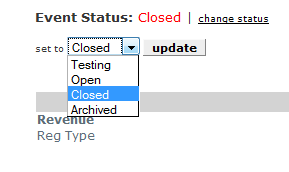

Once you have corrected your form, set the status back to Open.

While the event is Closed, your attendee prospects will see this screen:
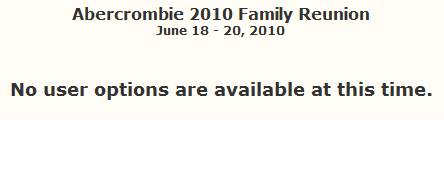


See also

I created my event, now what?
I need different prices for different registration types
I need an early bird price
I need to cut off some items by date
I am unsure about collect info for one registrant only
I have limited items and need to stop selling when sold out
I see attendees with HOLD status, what does that mean
I see that the quantity shown for registration types is too large
I need to add a check received for payment
I need to change the format of a custom question
I seem to be having problems with Paypal
I have my own merchant account - can I use it
What do you mean by 2 percent of checkout amount
Can I have an event with multiple locations
Can I have an event with multiple dates
Can I eliminate ads from my free event
I would like to add additional graphics to text areas
Why use Paypal
I don't seem to be getting an email for every confirmation
How much does Paypal cost
Are PlanetReg service fees adjusted for my currency
How do I pay my PlanetReg service fees
Who pays the PlanetReg service fee
Which browsers work best for PlanetReg
I created my event but it is asking for too much data.
Can I print badges
I can't load my image on the Form header
I loaded my logo/picture and it looks wierd
My inventory does not work
How do I cancel an attendee
I need to stop offering a registration type