Home > Event Home- Manage > Event home overview
Event home overview
When you first login to your existing
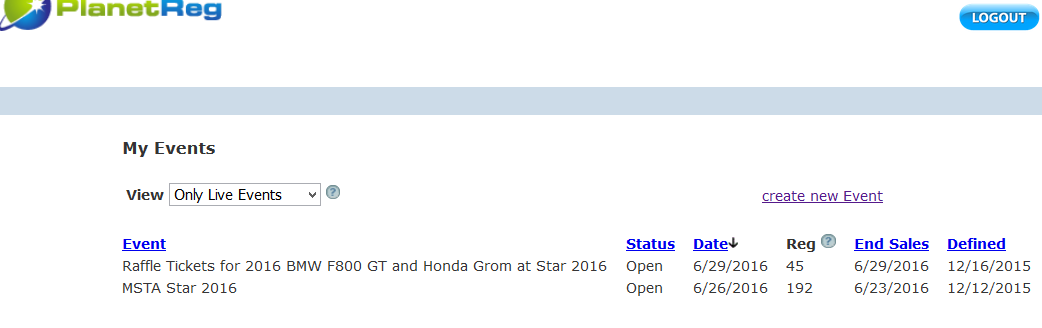
account (one with events defined), you will see list of your events. To
proceed to an individual event dashboard, just click on the event name:
Once you have gone through all of the setup screens for your event, you will be placed in the Event Dashboard on the Event Home screen.
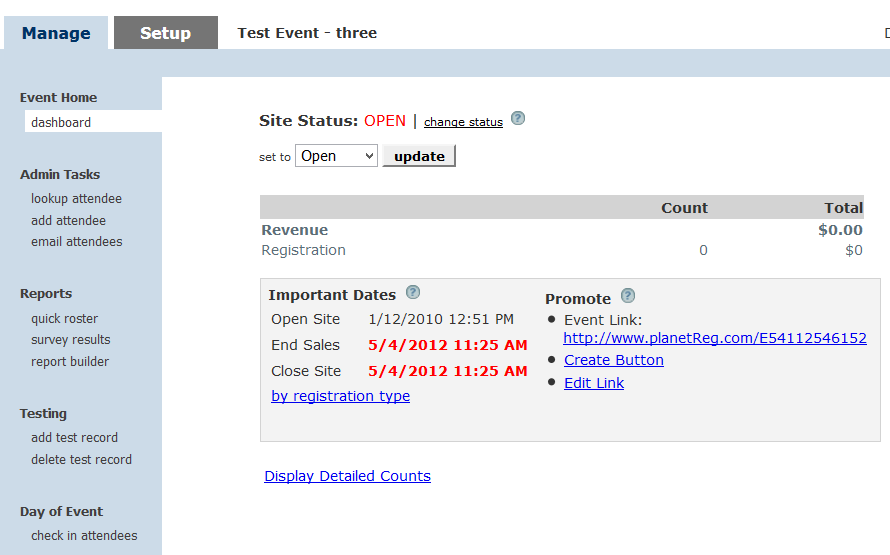
There are two tabs on this screen - Manage and Setup. If you have more Setup work, click that tab and all of the component sections of your event will be shown. Just click the section you wish to modify and it will be displayed in a window adjacent to the menu.
The following help segments will step you through all of the various tasks that can be accomplished from your Event Home, Manage tab:
- Dashboard - the default landing when you click the Manage tab. Displays some counts, shows you the event link and has an additional link to see detailed counts of your registrant choices.
- Look up an attendee, will not only allow you to find any attendee in your data base, but will allow you to make certain modifications to an attendee record.
- Add an attendee, allows you to enter attendees from your administrator login.
- Email attendees, allows you to set up and email attendees based on criteria you choose.
- Produce a roster report, allows you to list all of your attendees and download a delimited file of attendees.
- Survey - allows you to look at survey results if you have conducted your survey.
- Builder - a more extensive roster report which gives you more selectivity. The builder can also produce financial reports.Edit Confirmations, allows you to add verbiage to the review screen and email confirmations your attendees will receive.
- Add a test registration, this can be done even after you have opened your event for active registration.
- Delete a test registration, can be used if you wish to keep your data base clean.
- Change the status of your event; i.e. Open the event.
- Copy your event link when you are ready to publish.
- See the financial totals for your event.
If your event is a free event, you also have the option of turning off ads. Free events in PlanetReg are ad supported, so you registrants will see ads supplied by Google on their registration page.
If you do not want your registrants to see these ads, you can turn them off by click the remove ads link. If you turn off ads, you will be charged .50 per checkout. There is a message regarding this charge when you turn off ads. Should you change your mind, there will be a link to re-instate ads, however you will be charged for any registrations occurring while ads are turned off.
See also